
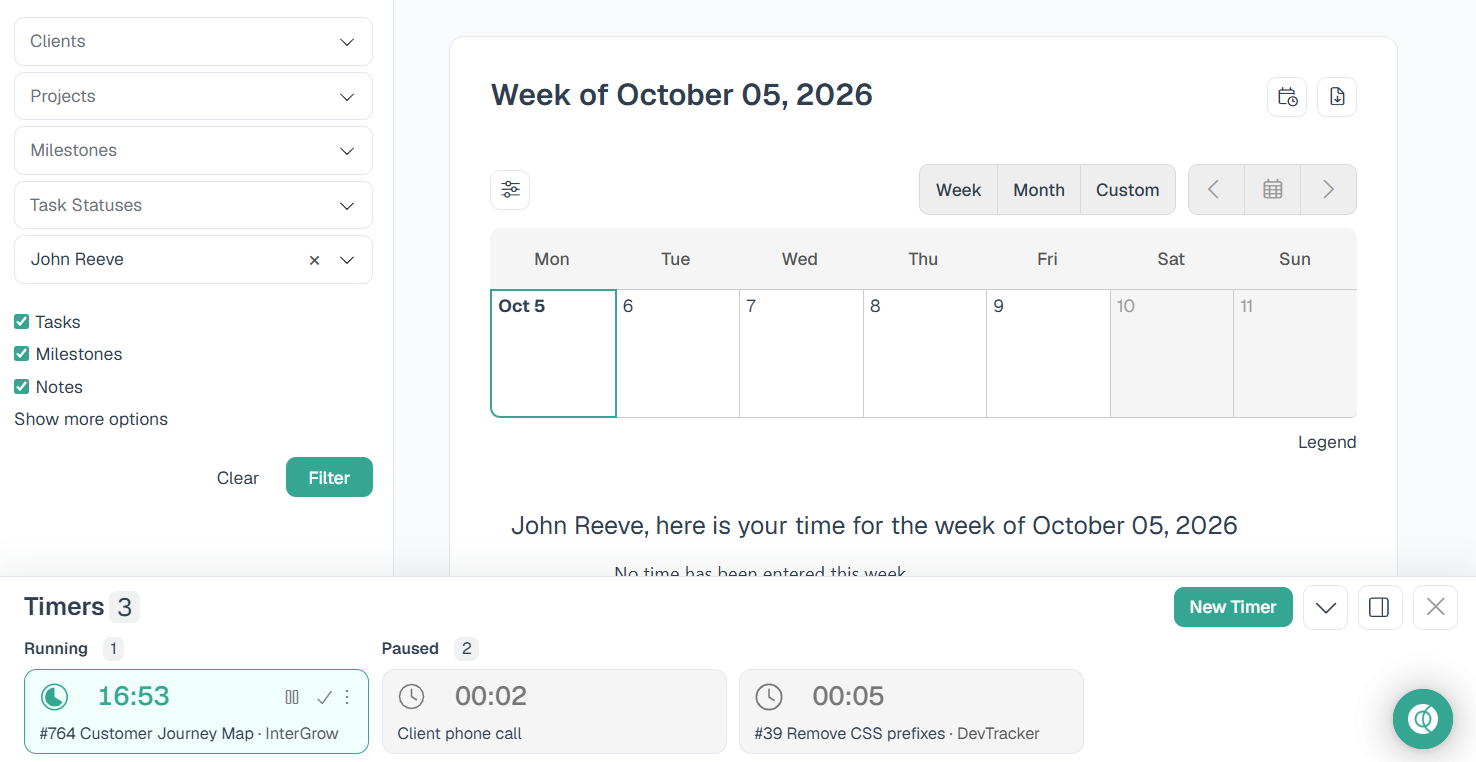
The timer drawer can sit on the right edge of the screen, or along the bottom. Use whichever gives you more room for the page you are working on. Intervals remembers your choice in this browser. It does not change the layout for anyone else on the account.
Note: This option is part of the new Intervals theme. On an older theme, timers stay in the footer dock.
Open the timer drawer
- Click the Timers button in the top right, or press the spacebar.
- The drawer opens on the right side of the screen.
Press the spacebar again, or click the Close button, to tuck it away.
Move the timers to the bottom
- Open the timer drawer.
- Click the Move timers to bottom button.
- The timers move to a bar across the bottom of the screen. The page above stays full width.
To put them back on the right, click the Move timers to right panel button.
Work from the bottom bar
The bottom bar has the same timers as the drawer.
- The New Timer button starts a general timer.
- Timers are grouped by Running and Paused.
- Scroll sideways when the timers do not all fit.
- Click the Close button, or press the spacebar, to hide the bar.
Collapse the bottom bar
Collapse the bar when you want the timers nearby without covering the page.
- With the timers along the bottom, click the chevron button.
- The bar shrinks to a single row.
- Click the chevron button again, or click Timers, to expand the bar.
The collapsed bar stays collapsed until you expand it, including the next time you open Intervals in this browser.